WhatsApp Guide
How to connect ChatGPT to WhatsApp Business
- Last verified November 2026
- Last tested 2026-11-08 on ChatGPT Plus, web, no Developer mode
In ChatGPT's Plugins, add https://api.spun.com/api/mcp as a custom MCP server and sign in. Spun is a hosted MCP server on your own WhatsApp number: not a browser extension, not a customer-facing bot, no Business API, no API key. After the 7-day trial it stays free within usage limits, card on file, never charged unless you upgrade. ChatGPT is billed separately.
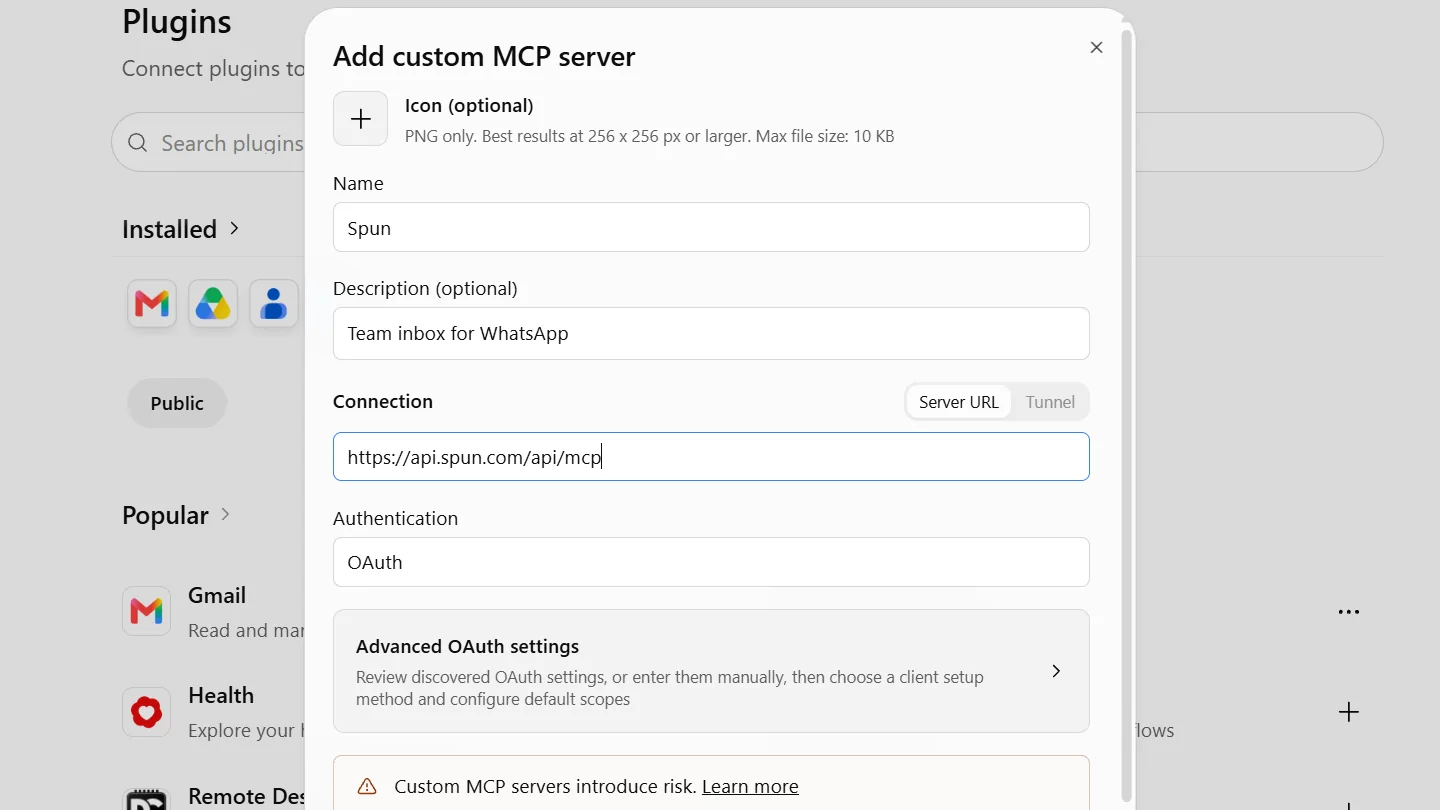
You connect ChatGPT to WhatsApp Business by adding Spun to ChatGPT as a connector, using the address https://api.spun.com/api/mcp, and signing in with your Spun account. ChatGPT calls these custom MCP servers, listed under Plugins; this guide says connector for the general idea. ChatGPT can then read the chats on your own WhatsApp number and draft replies at the access level a manager picks. By default, every message it wants to send waits for a person to approve.
Spun sits in the middle: it holds the WhatsApp side as a linked device on your existing number, and ChatGPT talks to Spun through the connector. This guide covers the clicks, what you need first, what ChatGPT can and cannot do once connected, and where the data goes.
Free MCP: ChatGPT on your WhatsApp number, free after your trial
Every account starts with 7 days of everything, no card. Connect ChatGPT during the trial and save a card, and your account continues on Free MCP for as long as you use it: 100 AI calls a month, up to 200 different contacts a month, and every send waits for your approval. Nothing is charged unless you choose a paid plan.
Video transcript
Here is how to connect ChatGPT to your WhatsApp number with Spun. In ChatGPT, open Plugins, click Add at the top right, and choose Add custom MCP server. Name it Spun, and paste the server address: api dot spun dot com, slash api, slash mcp. Leave authentication on OAuth. Tick the box to confirm you trust the server, then press Create as a plugin. ChatGPT asks to connect Spun. Click Connect Spun. You land on Spun. Sign in with your Spun account, or create one. Every account starts with seven days of everything, no card needed. Spun asks which access level ChatGPT gets. Read-only analyst only reads. Assistant with sends can draft and propose messages, and every send waits for a person on your team to approve it. You can also limit ChatGPT to chosen labels and chats. Then press Allow access. Back in ChatGPT, Spun shows under Installed. Ask your first question, like: which customers are still waiting for an answer since yesterday?
01
What do you need before you start?
- A Spun workspace with your WhatsApp number connected. Spun links to the number you already use by QR code, so there is no new number and no developer work.
- A ChatGPT plan that can add custom MCP servers. ChatGPT Plus works: Spun tested it on the web on 2026-11-08, without Developer mode. On Business and Enterprise, a workspace admin has to allow it, as documented by OpenAI and not tested by Spun.
- A manager of your Spun organization to approve the connection. Other members cannot.
You add Spun to ChatGPT yourself as a custom MCP server under Plugins, as described below.
02
How do you add Spun as a custom MCP server in ChatGPT?
- 1
Open Plugins and choose Add custom MCP server
In ChatGPT on the web, open "Plugins" in the left menu. The page has the tabs "Plugins" and "Skills" and an "Add" button at the top right. Choose "Add", then "Add custom MCP server".
- 2
Fill in Name and Server URL
Under "Name", type Spun. "Icon" and "Description" are optional. Under "Connection", keep "Server URL" and paste https://api.spun.com/api/mcp (copy it from the box below). Under "Authentication", keep "OAuth", the default. No API key is needed, and "Advanced OAuth settings" can stay closed.
- 3
Tick I understand and want to continue, then Create as a plugin
Under the notice "Custom MCP servers introduce risk", tick "I understand and want to continue", then choose "Create as a plugin".
- 4
Choose Connect Spun
ChatGPT opens a "Connect Spun" dialog. Choose "Connect Spun". The Spun sign-in page opens in the same tab.
- 5
Sign in with your Spun account
Use the login you use for the Spun inbox. If you have no Spun account yet, the same page lets you create one, with 7 days of everything free and no card.
- 6
Pick the access level and choose Allow access
On the Spun screen "Connect an AI assistant", a manager picks the "Access level": "Read-only analyst", "Assistant, no sends" (the default) or "Assistant with sends". A tick box adds photos and voice-note transcripts, and "Limit to" can keep ChatGPT to chosen labels and chats only. Then choose "Allow access". If the screen says no WhatsApp number is linked to the organization yet, link your number in Spun so ChatGPT has chats to read.
- 7
Ask your first question
Back in ChatGPT, Spun appears under "Installed" on the Plugins page. For now its row shows a generic "@" tile with no name; click it to open the plugin page "Spun, Team inbox for WhatsApp". Ask something like "Which customers are still waiting for an answer from yesterday?" It helps to give ChatGPT the Spun skill file at spun.com/mcp/SKILL.md, which explains the tools, send approval and the read allowance.
Spun tested this path on 2026-11-08 with ChatGPT Plus on the web, without Developer mode. ChatGPT changes its menus from time to time, and on Business and Enterprise workspaces an admin setting can decide what members may add, which Spun does not control. The Spun docs keep the current path and the date Spun last checked it.
https://api.spun.com/api/mcp
Related: Spun docs: client compatibility table and current setup paths · Create your first MCP key (for clients that take one) · Connection not working? The MCP connection readiness checker · Five business workflows to try once connected
03
Which access level should you pick?
Start with Read-only analyst and widen it once you have seen how ChatGPT behaves. You can change the level in place later, under Settings, AI Assistant (MCP), Connected AI apps, or disconnect the app there.
| Access level | What ChatGPT can do | Can it send? |
|---|---|---|
| Read-only analyst | Read conversations, groups and contacts | No |
| Assistant, no sends | Also organize chats and draft replies | No |
| Assistant with sends | Also propose and schedule messages | Only through your approval settings |
Photos and voice-note transcripts are a separate choice on the same consent screen.
04
Can ChatGPT send WhatsApp messages by itself?
Not by default. At Assistant with sends, each message ChatGPT proposes waits in Spun Tools, Automate, AI Sends, showing the real content, recipient, channel and stated reason. A teammate approves, edits or rejects it, and approval is what sends it. Quiet hours and your other sending rules still apply.
A manager can allow one connected app to send text without approval, inside Spun settings and with a typed confirmation. The consent screen never grants this, and photos and files sent by an AI app always wait for a person.
05
What can ChatGPT see, and where does the data go?
It sees only what your connected number has and what its access level allows: the groups your number is in, and messages since you linked plus the history handed over. Members who hide their number stay hidden. Scanned PDFs and video are not read.
What ChatGPT reads goes to OpenAI, under your own ChatGPT account and its terms, so check your plan's data settings before you connect customer conversations. Spun does not give ChatGPT access to anything outside your Spun organization.
06
Is this the same as a ChatGPT chatbot on WhatsApp?
No. Your customers do not talk to ChatGPT. ChatGPT stays in your ChatGPT window and works for you and your team when you ask: summarize the week, find open requests, draft a reply. Nothing answers customers on its own because of this connection.
If you want automatic answers to customers, that is a different feature. Spun has auto replies and an optional AI chatbot that you switch on yourself.
Related: AI auto replies
07
What does it cost?
You pay for your ChatGPT plan with OpenAI. On Spun, every account starts with 7 days of everything and no card. If ChatGPT is connected during the trial and you save a card, your account continues on Free MCP at $0: 100 AI calls a month, up to 200 different contacts a month, every send approved by a person, 7 days of message history and one number. Nothing is charged unless you pick a paid plan.
Paid plans start at $49 per month with unlimited team members and add scheduled workflows, automations, longer history and larger read allowances per billing period. Reads by a connected app never use your Spun AI credit, and the settings panel shows how many reads you have used.
Related: Free MCP next to the paid plans · Pricing · How to connect Claude to WhatsApp · Reports your AI can read
08
Using a different AI?
The same Spun MCP server works with Claude, Gemini, Cursor and other MCP clients, at the same address.
Developer docs
Keys, scopes and limits, documented
About Spun
Spun (spun.com) is a shared WhatsApp inbox for teams. It connects to the WhatsApp number a business already uses through WhatsApp's linked-device (QR) mechanism, so it needs no Business API and charges no per-message fees. Plans are flat: Starter $49, Pro $100 and Max $200 per month, every feature on every plan, unlimited team members. Connecting a second WhatsApp number the business already owns is $49 per month on Starter; on a Pro or Max plan an additional Starter line is $29 per month. Spun does not provide phone numbers or verification codes. Each team member can be restricted to specific conversations or customers. Runs in any web browser; native mobile apps are in beta. Made by Spun Life LLC. Not affiliated with WhatsApp or Meta.
FAQ
Frequently asked questions
Yes. Every Spun account starts with 7 days of everything, no card. Connect ChatGPT during the trial and save a card, and your account continues on Free MCP: 100 AI calls a month, up to 200 different contacts a month, 7 days of history, one number, and every send waits for your approval. The card is never charged unless you choose a paid plan, at least one AI read every 7 days keeps the number connected, and your ChatGPT plan with OpenAI is separate.
Ask ChatGPT about your real WhatsApp chats
Connect the number you already use, add Spun under Plugins in ChatGPT and start read-only. 7 days of everything free, then Free MCP with a card on file, or a paid plan when you want more.
More WhatsApp guides
WhatsApp Web for Business · Did Someone Block You · Virtual Numbers · The 6-Digit Code · Broadcast Messages · Block & Unblock · Sending Links · QR Codes & Linked Devices · Ticks & Read Receipts · WhatsApp Banned · Ban Signals · Business Account Banned · Temporarily Banned · Spam Bans · Bulk Messages Without a Ban · Marketing Without Bans · Warming Up a Number · Networks, VPNs and Bans · WhatsApp Business API Pricing · WhatsApp Business on Multiple Devices · Connect Claude to WhatsApp · Unban a WhatsApp Number · Number Blocked · Broadcast Limits · WhatsApp Proxies · Shared Proxy vs Self Proxy · Spun Box · Can Spun Get My WhatsApp Banned? · WhatsApp LIDs · WhatsApp Usernames · WhatsApp Desktop App · Meta AI in WhatsApp · WhatsApp Ads · WhatsApp Business API Pricing in India · Bulk WhatsApp Message Senders in India · WhatsApp Customer Support for a Small Team · Share a WhatsApp Business Account With Your Team · WhatsApp for Teams in India · Analyze WhatsApp group chats · WhatsApp profile pictures · WhatsApp for Hotels · WhatsApp Etiquette for Hotel Guests · Hotel WhatsApp Message Templates · Travel Agency WhatsApp Templates · Manage WhatsApp Groups for Tour Operators · WhatsApp Translation for Tourism · WhatsApp Automation Without the Business API · WhatsApp Ban Risk for Travel Agencies · What Is a CRM for WhatsApp · Free CRM for WhatsApp · CRM for WhatsApp Without the Business API · Connect WhatsApp to a CRM · What Is a Shared WhatsApp Inbox · WhatsApp Business App vs API vs Team Inbox · Disadvantages of a WhatsApp Business Account · Translate WhatsApp Messages · Transcribe and Translate Voice Notes · ChatGPT WhatsApp connector not working · Can ChatGPT send WhatsApp messages? · Things ChatGPT can do with your WhatsApp chats · Can ChatGPT read my WhatsApp messages? · What is a WhatsApp MCP server? · WhatsApp MCP servers compared · Install the Spun skill